Industry workflow page

Extract Invoice Data Into PDF Forms Automatically

Upload invoice images or scanned PDFs and let DullyPDF extract vendor names, amounts, dates, and line items into your form fields using AI vision.

Workflow examples for Invoice PDF Processing

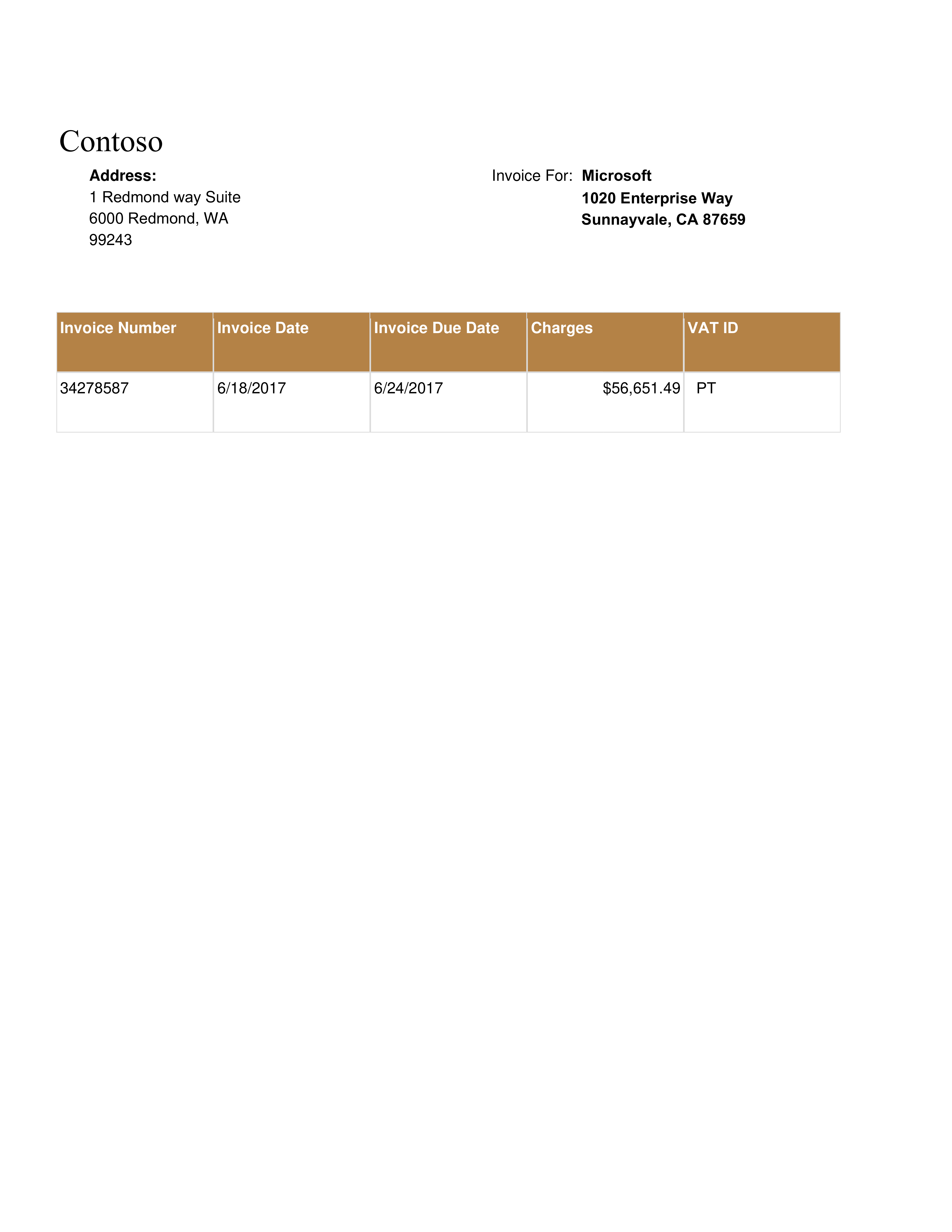
Sample invoice image used as a source document for extraction into PDF fields.
Invoice workflows usually start with an unstructured source document, which is why extraction quality matters before anything is written into the destination PDF.
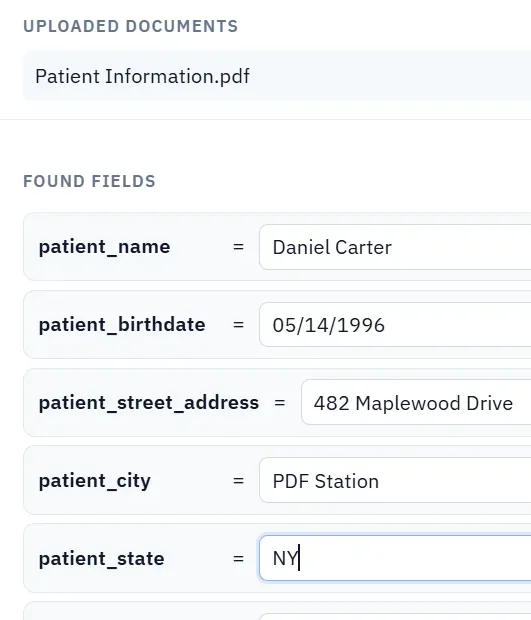
Fill from Images workflow preview in DullyPDF.
DullyPDF bridges that gap by reading the invoice semantically and suggesting values for the mapped destination fields before the operator commits them.

Why invoice data entry into PDF forms is still painful

Most businesses receive invoices as images, email attachments, or scanned PDFs. When that data needs to land in a structured PDF form — whether for purchase orders, expense reports, payment authorization, or tax documentation — someone has to read the invoice and type the values manually.

That manual step is where errors happen, time is lost, and scaling becomes impossible. DullyPDF Fill from Images and Documents removes that bottleneck by letting the AI read the invoice and suggest the matching values for each form field.

How Fill from Images and Documents works for invoices

Set up your PDF form template in DullyPDF with named fields (vendor name, invoice number, date, total amount, line items). Upload one or more invoice images or scanned PDFs. The AI vision model reads each invoice, matches extracted data to your form fields using both field names and nearby label context, and returns values with confidence scores.

You review the results, edit any values that need correction, reject fields you want to fill manually, and apply the rest. The entire process takes seconds instead of minutes per invoice.

Common invoice processing scenarios

Accounts payable teams processing vendor invoices into payment authorization forms. Construction companies extracting subcontractor invoice data into project cost tracking PDFs. Healthcare organizations filling insurance claim forms from provider invoices. Accounting firms pulling client invoice data into tax preparation worksheets.

In each case, the source is an unstructured invoice and the destination is a structured PDF form. Fill from Images and Documents bridges that gap without requiring custom OCR pipelines or enterprise software.

Credit cost for invoice processing

Each uploaded invoice image costs 1 credit. Scanned PDF invoices cost 1 credit per 5 pages (rounded up per document). The dialog shows the exact cost before extraction runs. Credits come from the same OpenAI pool used by Rename and Map operations.

For high-volume invoice processing, Premium plan users get 500 monthly credits with optional 500-credit refill packs. Most single-page invoice extractions cost just 1 credit.

Why teams use Invoice PDF Processing

  • Upload photos or scans of invoices and extract vendor, date, and amount data automatically.
  • Map extracted values to your PDF form fields with confidence-scored review before applying.
  • Eliminate manual data entry for recurring invoice-to-form workflows across AP, accounting, and procurement.

Implementation signals for Invoice PDF Processing

  • AI vision reads invoices semantically — it matches by meaning, not exact position.
  • Each extraction shows per-field confidence scores so operators can verify before committing.
  • Credits are transparent: 1 credit per image, 1 credit per 5 pages for PDF documents.

Need deeper technical details about invoice pdf processing? Use the Rename + Mapping docs and Search & Fill docs to validate exact behavior.

Frequently asked questions about Invoice PDF Processing

Can I extract data from a photo of an invoice?

Yes. Upload a photo (JPG, PNG) of the invoice and Fill from Images and Documents will extract matching values into your template fields.

Does this work with multi-page scanned invoices?

Yes. Upload the invoice as a PDF and each page is rendered and analyzed. Costs 1 credit per 5 pages.

How accurate is the extraction?

Each extracted value shows a confidence score. Clear, well-lit documents typically achieve 80-95% confidence. You can edit or reject any value before applying.

What invoice fields can be extracted?

Any field on your template: vendor name, invoice number, date, amounts, line items, tax ID, addresses, and more. The AI matches by semantic meaning, not fixed positions.

How many credits does invoice processing cost?

Each image costs 1 credit. Each PDF document costs 1 credit per 5 pages. The dialog shows the cost before you click Send.

Docs for Invoice PDF Processing

Use these docs pages to verify the exact DullyPDF behavior behind invoice pdf processing before you ship it as a repeat workflow.

Related routes for Invoice PDF Processing

These adjacent routes cover neighboring document workflows and team use cases that usually get evaluated alongside invoice pdf processing.