Commercial workflow page

Collect PDF Answers With Native Fill By Link

Start from a saved DullyPDF template, publish a mobile-friendly form link, collect respondent answers, and generate the filled PDF in the workspace.

Workflow examples for Fill PDF By Link

Respondent-facing web form generated from a PDF template.
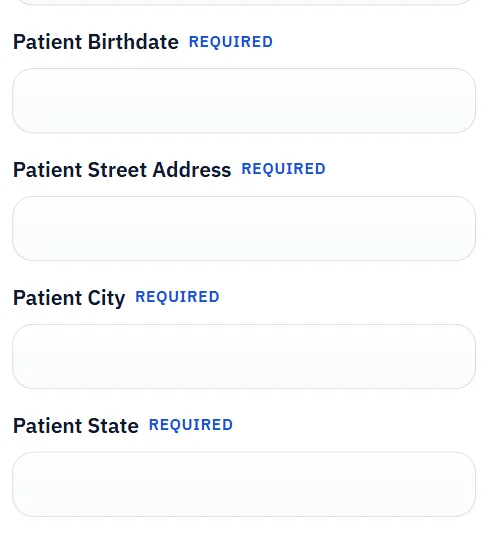
The public form is where respondents provide the missing row data before the owner turns it into the final PDF.
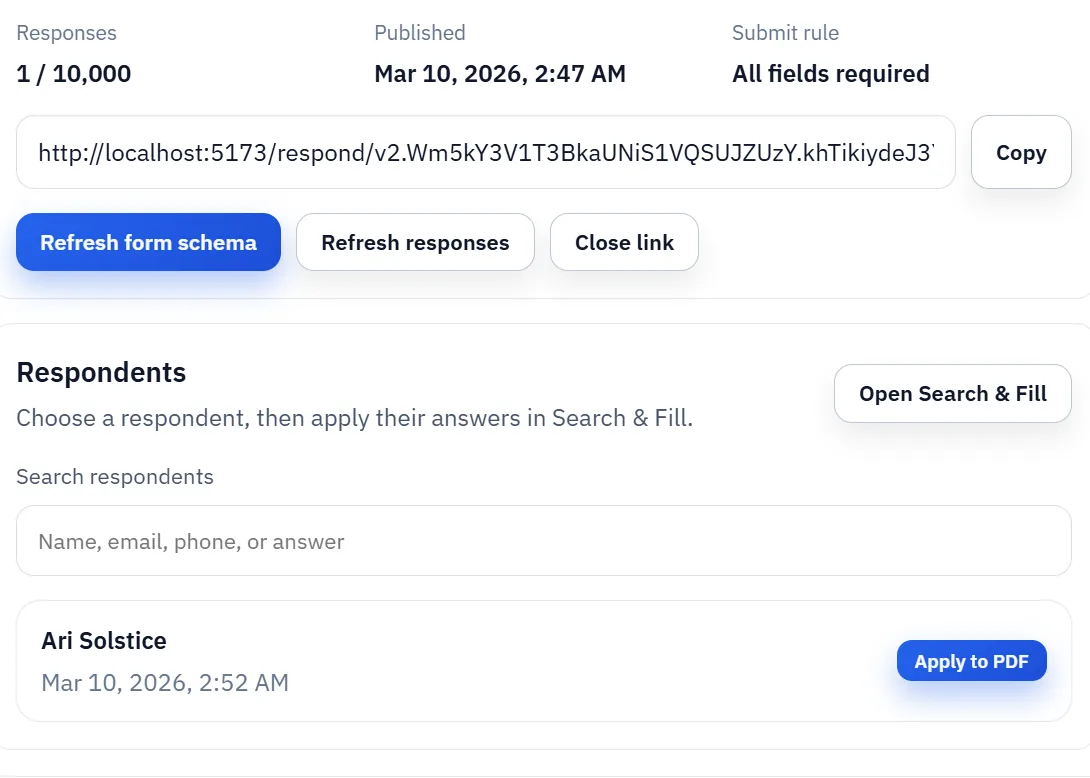
Published Fill By Link manager showing response intake and later Search and Fill handoff.
After publish, the owner reviews responses and applies them to the saved template inside the workspace.

Web form + sign demo

Fill a PDF web form and sign it in the browser

This walkthrough shows how DullyPDF combines Fill By Link with the e-signature workflow: share a hosted web form link, let the respondent fill and sign the PDF in the browser, and collect the finished document along with an E-SIGN and UETA compliant audit trail.

Web form + sign walkthroughWatch on YouTube

Use this video when you need to validate the end-to-end hosted PDF web form and e-signature handoff before sending a real respondent link to clients, patients, tenants, or employees.

Why collecting answers by link is different from sending a PDF

Many teams do not actually want respondents opening and editing a PDF on a phone. They want the information collected in a simpler web form, then they want the final PDF generated later in a controlled owner workflow. That distinction matters because it separates data collection from document generation.

DullyPDF Fill By Link is built around that separation. The respondent submits answers through a mobile-friendly HTML form, while the owner keeps the saved template, stored responses, and final PDF generation workflow inside the workspace. That usually creates a cleaner process than emailing PDFs back and forth or relying on manual re-entry after someone submits a form.

How the owner workflow works in DullyPDF

The workflow starts from a saved template or saved-form group. The owner publishes a link, configures the respondent-facing form, collects responses, and then reviews those records later in the workspace. At that point the owner can choose a respondent, run the fill step, and generate the final PDF on demand.

This is useful because the template remains the canonical source of truth. You do not lose control over field mapping, document versioning, or output QA just because the data arrived through a link. The same mapped template still drives the finished PDF.

  • Publish from a saved template or saved-form group.
  • Collect structured responses through a mobile-friendly form.
  • Review the saved responses in the workspace before generating the PDF.

When Fill By Link is a better fit than direct spreadsheet filling

If you already have the data in CSV, XLSX, or JSON, Search & Fill is usually the fastest route. Fill By Link becomes more valuable when the row data does not exist yet or when respondents need to provide it themselves. Intake forms, applicant workflows, patient questionnaires, and client-submitted requests are the natural fit.

The key advantage is that you still end up with structured records that can flow into the same template logic used for local rows. It is not a separate system with a separate document model. It is another way to source the row data that the PDF template needs.

How Fill By Link differs from Search and Fill and from signature workflows

Search & Fill assumes the operator already has the row and wants to choose it inside the workspace. Fill By Link assumes the row does not exist yet and needs to be collected from a respondent first. Signature workflows are a third step entirely: they matter after the record is complete and a final immutable PDF is ready to be reviewed and signed.

That progression is useful operationally. Data collection belongs here, row selection belongs in Search & Fill, and final signer action belongs in the signing routes. Treating those as separate pages reduces product confusion and lets each route answer a narrower search intent more clearly.

How to handle corrections, edits, and resubmission requests

Respondent collection rarely ends after the first submit. People mistype values, skip optional details, or need to update information after the owner reviews the response. The safest operating pattern is to treat the stored response as the review object, decide whether the response is usable, and only then materialize the final PDF. That keeps bad submissions from becoming premature output files.

When corrections are common, the owner workflow matters more than the public form itself. Teams need a clear process for deciding whether to ask for another submission, edit the template, or simply select a corrected record before generating the document. Fill By Link works best when that review step is intentional instead of implied.

Why owner review should happen before the final PDF exists

A stored response is not yet the final document. It is the structured record that can drive the final document. That distinction helps teams catch missing values, confirm respondent identity or context, and decide whether the active template or group is still the right one before they generate the PDF.

The operational win is control. Owners can inspect the submission, route it into Search & Fill, and generate the output only when the document is actually needed. That is usually safer than creating PDFs automatically for every submission regardless of quality.

When Fill By Link is better than sending a PDF or jumping straight to e-sign

Use Fill By Link when the main need is data collection from a respondent who should not be editing the actual PDF directly. Use a direct PDF workflow when the operator already has the data and only needs to materialize the file. Use the signature workflow after the record is complete and the final immutable version is ready for signer review.

That sequence keeps the product model coherent. Fill By Link collects the row, Search & Fill materializes the row into the template, and signature routes only start after the record is finalized. Trying to collapse those stages too early usually creates weaker operational controls and weaker SEO separation between the routes.

Why teams use Fill PDF By Link

  • Publish a DullyPDF-hosted HTML form from any saved template.
  • Store respondent answers as structured records under the template owner account.
  • Optionally let template respondents download their submitted PDF copy on the success screen.
  • Pick a respondent later in the workspace and fill the source PDF on demand.

Implementation signals for Fill PDF By Link

  • Base includes monthly Fill By Link collection with 25 accepted responses across the account.
  • Premium unlocks high-volume Fill By Link collection with up to 10,000 accepted responses per month across the account.
  • Respondent records can be reused through the same Search & Fill workflow before download.

Need deeper technical details about fill pdf by link? Use the Rename + Mapping docs and Search & Fill docs to validate exact behavior.

Frequently asked questions about Fill PDF By Link

Does the respondent fill the actual PDF?

No. The respondent fills a DullyPDF-hosted mobile-friendly HTML form. Template links can optionally expose a post-submit PDF download, but the owner still manages the saved response and final workflow in the workspace.

How many Fill By Link responses are allowed on free and premium?

Base includes 25 accepted Fill By Link responses per month across the account. Premium supports up to 10,000 accepted responses per month across the account.

Can I publish one link for every template?

Premium users can publish a shareable link for every saved template they keep in DullyPDF. Free users are limited to 1 active published link at a time.

Guides for Fill PDF By Link

These walkthroughs and comparison posts cover the same workflow cluster from an operator point of view, which helps you move from a route summary into a more specific implementation path.

Docs for Fill PDF By Link

Use these docs pages to verify the exact DullyPDF behavior behind fill pdf by link before you ship it as a repeat workflow.

Related routes for Fill PDF By Link

These adjacent workflow pages cover nearby search intents teams compare while evaluating fill pdf by link.