Commercial workflow page

PDF Signature Workflow for Email and Web Forms

Two signing entry paths: send a final PDF by email, or collect answers through a web form first and then freeze the filled PDF for signature.

Workflow examples for PDF Signature Workflow

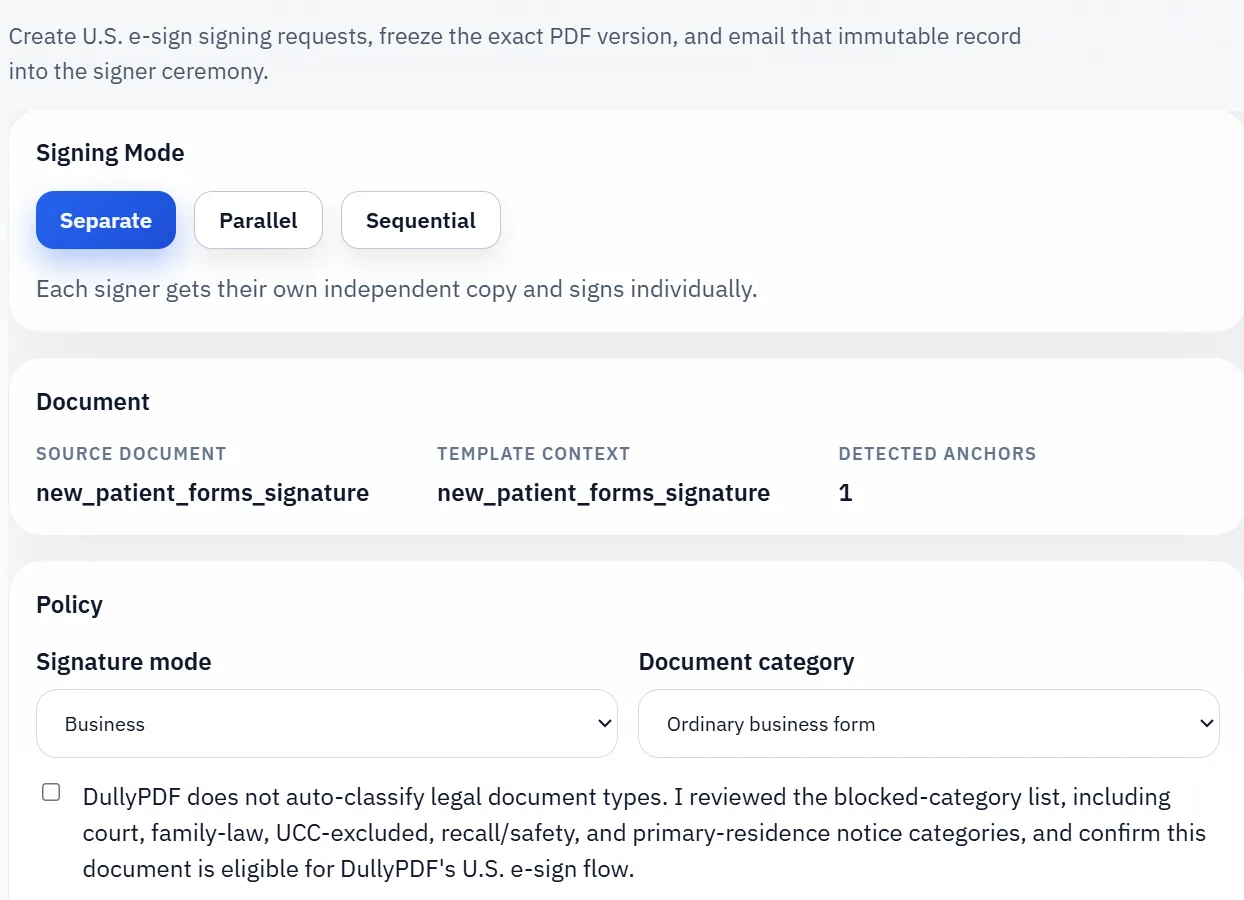
DullyPDF signature workflow with signer mode and document policy controls.
The clean signing path starts when the reviewed final PDF is frozen and routed into a controlled signer ceremony.
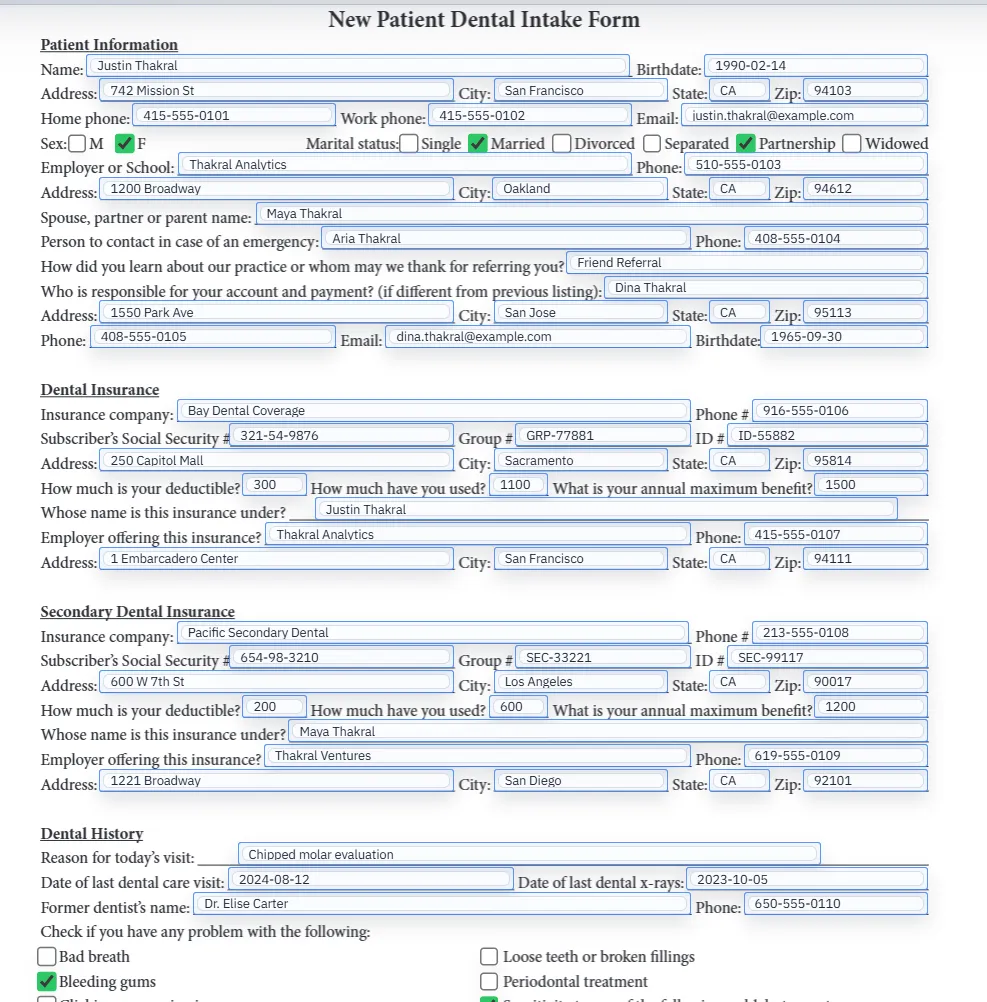
Filled PDF preview before the record is frozen for signing.
That signing step only works well after the document has already been reviewed as the exact record the team intends to keep.

E-sign pipeline

DullyPDF E-Sign Pipeline — every signing workflow, every industry

Single-signer, sequential multi-signer, parallel multi-signer, Fill By Link → sign, group fill → multi-sign, and API Fill → sign — walked end to end across HR onboarding, healthcare intake, real estate, legal, insurance ACORD, and immigration USCIS workflows.

E-sign walkthroughWatch on YouTube

Use this video as the canonical reference for DullyPDF e-signatures: pick the signing workflow your team actually runs, then match it to the industry-specific packet you already send out today.

Why a real PDF signature workflow is more than drawing a name on a page

Teams looking for a PDF signature workflow usually do not need a decorative image tool. They need a process that can answer practical business questions later: What exact PDF was reviewed? Which signer session completed the request? Was the signer presented with the final record before completion? What artifacts can the owner retrieve after the fact? A page overlay by itself does not answer those questions.

DullyPDF therefore treats signing as the last stage of a record workflow, not as a floating annotation step. The signer enters a dedicated ceremony, reviews the exact PDF that will be signed, adopts a signature inside that ceremony, and completes an explicit finish action. The resulting signed artifacts remain tied to the request and visible to the owner in the workspace rather than disappearing into a one-time browser event.

Direct email-to-sign pipeline step by step

The first route is the straightforward one: the owner already has the exact PDF that should be signed. In that case the workflow is current PDF -> materialized immutable snapshot -> signer request -> public signing ceremony -> signed artifact retrieval. The key control is that the owner is not emailing a mutable workspace object or relying on the recipient to sign whatever happens to be open in the editor later. DullyPDF freezes the source record before send.

Once the immutable snapshot is created, the signer is invited into the public ceremony, not a generic download link. Business-mode requests move through review, adopt-signature, and finish-sign. Consumer-mode requests add the extra disclosure and access-check stage before signature because the legal standard is different when a consumer must consent to receiving required information electronically.1a The owner retains the request, the immutable source PDF, the final signed PDF, and the audit receipt in one place after completion.

  • Owner finalizes the current PDF in the workspace.
  • DullyPDF materializes and stores one immutable source PDF for the request.
  • The signer receives an email invitation into the bound public signing ceremony.
  • The signer reviews the retained PDF, adopts a signature, and explicitly completes the request.
  • The owner can later retrieve the signed PDF and audit receipt from the workspace.

Fill By Web Form to sign pipeline step by step

The second route starts with data collection, not with a final PDF. Here the public respondent first completes a DullyPDF-hosted HTML form. The response is stored. If the owner enabled required signature after submit, DullyPDF uses that stored response to materialize the filled PDF server-side and only then routes the signer into the same signing engine used for direct email sends. The signer is not signing an abstract set of web-form answers. The signer is signing one final PDF generated from the stored response.

That distinction matters operationally and legally. It lets the owner prove which record moved from intake into signature, and it prevents drift between the collected answers and the PDF presented for signature. The respondent-side form can still be mobile-friendly and easier to complete than a raw PDF, but the signature event stays attached to one retained PDF output instead of a free-floating form session.

  • Public respondent answers are stored before signing begins.
  • DullyPDF server-side materializes the exact filled PDF from the stored response.
  • The signer receives an emailed signing request for that exact filled record.
  • Signing completion remains visible from the linked Fill By Link response row in the owner workspace.

What the signer actually sees and why that matters

The signer does not drop a signature on a mutable editor view. The signer sees the exact PDF that has already been frozen for that request. For business-mode flows, the sequence is review -> adopt signature -> finish sign. For consumer-mode flows, the signer also gets the disclosure and access-check sequence first. That keeps the act of signing logically tied to the same retained record the owner will later rely on.

This is the part of the workflow that makes the product more than a signature stamp utility. The signer experience is built to show one exact record, require a deliberate action, and produce a result that can be re-opened later by the owner. That is the useful operational outcome when a company needs signed service paperwork, acknowledgments, authorizations, intake packets, or receipt-style confirmations to stay available after the browser session is gone.

How the workflow maps to the U.S. e-sign rules that matter most in practice

For supported records, the workflow is designed around the main federal and uniform-law rules that operational teams actually need to understand. Under 15 U.S.C. § 7001(a)(1)-(2), a signature, contract, or record generally cannot be denied legal effect solely because it is electronic.1b UETA § 7 carries the same legal-recognition principle.3a DullyPDF supports that model by attaching the signer ceremony to one immutable PDF instead of letting the signature act drift away from the retained record.

15 U.S.C. § 7001(b)(2) also matters because it says a person is not required to agree to use or accept electronic records or signatures.1c That is why the workflow still exposes manual fallback rather than presenting electronic signing as the only permissible option. And when the transaction is consumer-facing, 15 U.S.C. § 7001(c)(1)(A)-(C) matters because it requires affirmative consent, advance disclosures, and an access demonstration.1d DullyPDF therefore adds a separate consumer consent layer before signature completion in that mode.

For retention, 15 U.S.C. § 7001(d)(1) and UETA § 12 matter because the retained record must remain accurate and accessible later.1e3b That is why the workflow is built around the immutable source PDF, the final signed PDF, and a tied audit receipt rather than a transient event log alone. The product design choice is straightforward: preserve the record that was signed and preserve the owner retrieval path afterward.

  • 15 U.S.C. § 7001(a)(1)-(2): electronic records and signatures are not denied effect solely because they are electronic.1f
  • 15 U.S.C. § 7001(b)(2): the product keeps manual fallback because electronic signing cannot simply be forced on every signer.1g
  • 15 U.S.C. § 7001(c)(1)(A)-(C): consumer requests require disclosure, consent, and access demonstration.1h
  • 15 U.S.C. § 7001(d)(1) and UETA § 12: retained records must stay accurate and accessible later.1i3c
  • UETA § 9 and 9 NYCRR 540.4(b): the process is designed so the signature remains logically associated with the PDF record.3d4a

Supported document classes that fit DullyPDF well today

The best fit is ordinary U.S. business records where one signer should review one exact PDF and the owner needs the finished artifacts back in the same workspace. That includes service agreements, vendor acknowledgments, engagement letters, proposal acceptances, change-order acceptances, delivery receipts, work-order signoffs, equipment receipts, inspection acknowledgments, and similar records where the business benefit comes from a clear retained PDF and a recoverable signature trail.

The workflow also fits many intake and authorization patterns. Examples include client or patient intake packets when the organization already handles any separate sector-specific disclosure duties outside the signing platform, routine authorization or consent forms, handbook acknowledgments, policy acknowledgments, volunteer releases, and internal onboarding packets. What matters is not the label alone. What matters is whether the organization needs a frozen PDF, a signer ceremony, and retained artifacts rather than a complex regulated delivery platform.

  • Good fit: service agreements, statements of work, engagement letters, and routine acceptance forms.
  • Good fit: acknowledgments, receipts, field-service signoffs, delivery confirmations, and inspection records.
  • Good fit: internal HR acknowledgments, equipment receipts, policy acknowledgments, and onboarding packets.
  • Good fit: intake, consent, and authorization packets when the business separately owns any sector-specific disclosure obligations.
  • Best fit pattern: one signer per request, one final PDF to review, and one retained artifact chain after completion.

Document classes that should stay out of the ordinary self-serve workflow

The workflow should not be marketed as suitable for every document that can physically hold a signature. 15 U.S.C. § 7003 excludes or carves out important categories, including wills and testamentary trusts, adoption and divorce matters or other family-law matters, court orders and notices, official court documents, cancellation or termination of utility services, default or acceleration or repossession or foreclosure notices for a primary residence, cancellation or termination of health or life insurance benefits, product recall or material-failure safety notices, and hazardous-material transport documentation.2a

15 U.S.C. § 7003 also excludes the Uniform Commercial Code other than sections 1-107 and 1-206 and Articles 2 and 2A.2b In practical product terms, that means DullyPDF should not present the ordinary self-serve signing workflow as the compliance answer for negotiable instruments, bank collection items, funds transfers, letters of credit, documents of title, investment securities, or secured transaction records simply because they can be rendered as a PDF. Those areas need their own legal analysis and often their own specialized operational controls.

Notarization, acknowledgment, witness, or filing regimes are another separate category. 15 U.S.C. § 7001(g) addresses notarization and acknowledgment requirements,1j and New York adds specific real-property recording rules in 9 NYCRR Part 540 and N.Y. Real Prop. Law § 291-i.4b5a DullyPDF can support ordinary signing workflows, but it is not a blanket replacement for remote online notarization, county recording systems, or witness-managed execution programs.

  • Keep out: wills, codicils, and testamentary trust instruments under 15 U.S.C. § 7003(a)(1).2c
  • Keep out: adoption, divorce, and other family-law records under 15 U.S.C. § 7003(a)(2).2d
  • Keep out: court orders, pleadings, official notices, and service-bound court records under 15 U.S.C. § 7003(a)(2).2e
  • Keep out: primary-residence foreclosure, eviction, utility shutoff, certain insurance cancellation, and safety or hazmat notices under 15 U.S.C. § 7003(b).2f
  • Separate review required: excluded UCC records outside sections 1-107, 1-206, and Articles 2 and 2A under 15 U.S.C. § 7003(a)(3).2g
  • Separate program required: notarized, acknowledged, witnessed, or recorded instruments.

What owners actually keep after signing is finished

A signature workflow is only useful if the owner can retrieve the finished artifacts later without depending on the signer to forward them back. DullyPDF stores the immutable source PDF, the final signed PDF, and a human-readable audit receipt tied to the request. For web-form-driven signature requests, the Fill By Web Form responses view also surfaces the linked signing status so the owner can see whether the response is waiting, signed, expired, revoked, or manually rerouted and can download the completed signed copy directly from that response row.

That owner-visible artifact chain is what turns the workflow into repeatable operations instead of a one-time send-and-hope process. The signer can still download their completed copy, but the record does not disappear into the respondent side of the experience. The owner keeps the final artifacts in the same workspace that created the template, the intake form, or the signing request in the first place.

What DullyPDF controls and what your business still must control

DullyPDF controls the mechanics of the supported signing workflow: immutable-PDF generation, public signer session flow, review and sign sequence, consumer consent ceremony for consumer-mode requests, retained signed artifacts, and owner retrieval inside the workspace. That is the product boundary. It is a meaningful boundary, but it is not the whole compliance universe for every document or industry.

The sender or business still owns transaction classification, whether the record belongs in a supported category, whether separate industry rules apply, whether the signer has authority and capacity to sign, whether witness or notary steps are required, whether additional identity proofing is needed, how paper copies and withdrawal requests are fulfilled operationally, and whether the retention period is sufficient for the governing legal regime. Those are not defects in the product. They are responsibilities that sit outside the workflow engine itself.

That is the right way to position the platform publicly. DullyPDF supports a detailed, retained, ordinary-business PDF signing workflow. It does not promise that every PDF with a signature line becomes compliant just because it moves through an electronic ceremony.

Why teams use PDF Signature Workflow

  • Run one PDF signing stack for two operational starts: direct email send or web-form-first intake.
  • Freeze one immutable PDF before the signer reviews, adopts a signature, and finishes the request.
  • Keep the owner artifact chain together: immutable source PDF, signed PDF, audit receipt, and request history.
  • Support ordinary U.S. business records without marketing the platform as a catch-all solution for excluded or heavily regulated document classes.
  • Explain what DullyPDF controls in the workflow and what the sender or business still must control outside the product.

Implementation signals for PDF Signature Workflow

  • The workflow is designed around 15 U.S.C. § 7001(a), (b), (c), and (d)1k, plus UETA §§ 7, 8, 9, and 123e, by centering signer action on one exact retained record instead of a detached scribble layer.
  • Consumer-facing requests add a separate disclosure, access-demonstration, and consent step before signing because 15 U.S.C. § 7001(c)(1)(A)-(C) imposes extra conditions for consumer electronic records.1l
  • Manual fallback remains available because 15 U.S.C. § 7001(b)(2) does not require a person to agree to electronic records or signatures.1m
  • Excluded categories under 15 U.S.C. § 70032h and state-specific recording or notarization programs under 9 NYCRR Part 5404c and N.Y. Real Prop. Law § 291-i5b are intentionally kept out of the ordinary self-serve workflow story.
  • The platform produces retained artifacts, but the business still owns transaction classification, sector-specific disclosure duties, signatory authority, and legal review for specialized programs.

Need deeper technical details about pdf signature workflow? Use the Rename + Mapping docs and Search & Fill docs to validate exact behavior.

Frequently asked questions about PDF Signature Workflow

Can DullyPDF send a PDF for signature by email without using a web form first?

Yes. The direct signing path starts from the current PDF, freezes that exact document into an immutable source record, and then emails the signer into the public signing ceremony.

Can DullyPDF collect answers through a web form and then send the same filled PDF into signing?

Yes. Template web forms can require signature after submit, which stores the answers, materializes the exact filled PDF from that saved response, and then sends that same retained record into the signing flow.

What U.S. legal standards does this workflow target?

It is designed around the main rules that matter for supported ordinary-business e-sign workflows, including 15 U.S.C. § 7001(a), (b), (c), and (d), UETA §§ 7, 8, 9, and 12, and New York ESRA concepts in 9 NYCRR Part 540 for logical association and record handling.1n3f4d

Does DullyPDF force every signer to use electronic signing?

No. The workflow keeps a manual fallback path because 15 U.S.C. § 7001(b)(2) does not require a person to agree to use or accept electronic records or signatures.1o

Which documents are the best fit for this workflow?

The best fit is ordinary business records such as service agreements, acknowledgments, receipts, work-order signoffs, intake packets, routine authorization forms, and internal employment acknowledgments where one signer should act on one final PDF and the owner needs retained artifacts afterward.

Which documents should stay out of the ordinary self-serve flow?

Wills, family-law matters, court documents, certain foreclosure, utility, insurance, safety, or hazardous-material notices, excluded UCC records, and notarized or recorded instruments should stay blocked or go through separate legal review and specialized programs.2i4e5c

Does DullyPDF itself decide whether a document is legally allowed to use e-signature?

No. DullyPDF enforces supported workflow controls, but the sender or business still must classify the transaction correctly, decide whether a document belongs in a supported category, and account for any industry-specific rules, notary requirements, witness requirements, or retention obligations.

Legal footnotes and sources for PDF Signature Workflow

  1. 1.15 U.S.C. § 7001 | General rule of validity and related provisions
  2. 2.15 U.S.C. § 7003 | Federal exclusions and exceptions
  3. 3.Uniform Electronic Transactions Act | overview and authoritative sources
  4. 4.9 NYCRR Part 540 | New York ESRA regulation
  5. 5.N.Y. Real Prop. Law § 291-i | Electronic recording

Guides for PDF Signature Workflow

These walkthroughs and comparison posts cover the same workflow cluster from an operator point of view, which helps you move from a route summary into a more specific implementation path.

Docs for PDF Signature Workflow

Use these docs pages to verify the exact DullyPDF behavior behind pdf signature workflow before you ship it as a repeat workflow.

Related routes for PDF Signature Workflow

These adjacent workflow pages cover nearby search intents teams compare while evaluating pdf signature workflow.